
Overview#
DataLab may be controlled remotely using the XML-RPC protocol which is natively supported by Python (and many other languages). Remote controlling allows to access DataLab main features from a separate process.
From an IDE#
DataLab may be controlled remotely from an IDE (e.g. Spyder or any other IDE, or even a Jupyter Notebook) that runs a Python script. It allows to connect to a running DataLab instance, adds a signal and an image, and then runs calculations. This feature is exposed by the cdlclient.SimpleRemoteProxy class.
From a third-party application#
DataLab may also be controlled remotely from a third-party application, for the same purpose.
If the third-party application is written in Python 3, it may directly use
cdlclient.SimpleRemoteProxy as mentioned above. From another language,
it is also achievable, but it requires to implement a XML-RPC client in this
language using the same methods of proxy server as in the
cdlclient.SimpleRemoteProxy class.
Data (signals and images) may also be exchanged between DataLab and the remote client application, in both directions.
The remote client application may be run on the same computer as DataLab or on different computer. In the latter case, the remote client application must know the IP address of the computer running DataLab.
The remote client application may be run before or after DataLab. In the latter case, the remote client application must try to connect to DataLab until it succeeds.
Supported features#
Supported features are the following:
Switch to signal or image panel
Remove all signals and images
Save current session to a HDF5 file
Open HDF5 files into current session
Browse HDF5 file
Open a signal or an image from file
Add a signal
Add an image
Get object list
Run calculation with parameters
Some examples are provided to help implementing such a communication between your application and DataLab:
See module:
cdlclient.tests.remoteclient_appSee module:
cdlclient.tests.remoteclient_unit
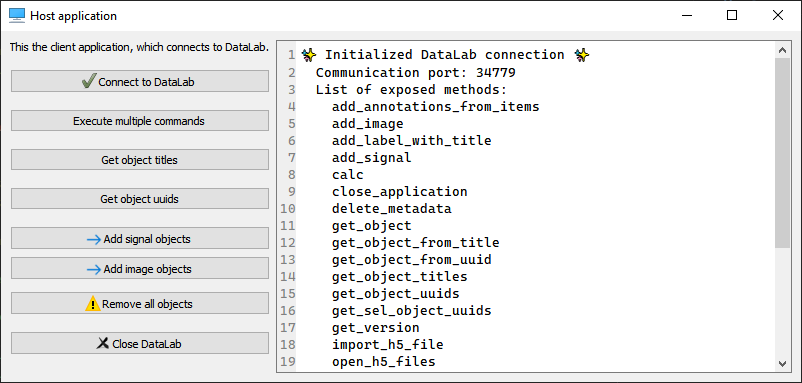
Screenshot of remote client application test (cdlclient.tests.remoteclient_app)#
Example#
Here is an example in Python 3 of a script that connects to a running DataLab instance, adds a signal and an image, and then runs calculations (the cell structure of the script make it convenient to be used in Spyder IDE):
# -*- coding: utf-8 -*-
"""
Example of remote control of DataLab current session,
from a Python script running outside DataLab (e.g. in Spyder)

Created on Fri May 12 12:28:56 2023

@author: p.raybaut
"""

# %% Importing necessary modules

# NumPy for numerical array computations:
import numpy as np

# DataLab remote control client:
from cdlclient import SimpleRemoteProxy as RemoteProxy

# %% Connecting to DataLab current session

proxy = RemoteProxy()

# %% Executing commands in DataLab (...)

z = np.random.rand(20, 20)
proxy.add_image("toto", z)

# %% Executing commands in DataLab (...)

proxy.toggle_auto_refresh(False)  # Turning off auto-refresh
x = np.array([1.0, 2.0, 3.0])
y = np.array([4.0, 5.0, -1.0])
proxy.add_signal("toto", x, y)

# %% Executing commands in DataLab (...)

proxy.compute_derivative()
proxy.toggle_auto_refresh(True)  # Turning on auto-refresh

# %% Executing commands in DataLab (...)

proxy.set_current_panel("image")

# %% Executing a lot of commands without refreshing DataLab

z = np.random.rand(400, 400)
proxy.add_image("foobar", z)
with proxy.context_no_refresh():
    for _idx in range(100):
        proxy.compute_fft()
Additional features#
For simple remote controlling, cdlclient.SimpleRemoteProxy may be
used. For more advanced remote controlling, the cdl.RemoteCDLProxy class
provided by the DataLab (cdl) package may be used.
See DataLab documentation for more details about the cdl.RemoteCDLProxy
class (on the section “Remote control”).
Connection dialog#
The DataLab Simple Client package provides a connection dialog that may be used
to connect to a running DataLab instance. It is exposed by the
cdlclient.widgets.ConnectionDialog class.
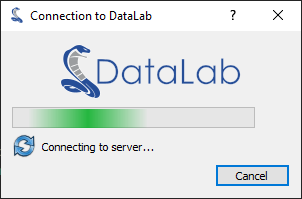
Screenshot of connection dialog (cdlclient.widgets.ConnectionDialog)#
Example of use:
# Copyright (c) DataLab Platform Developers, BSD 3-Clause license, see LICENSE file.

"""
DataLab Remote client connection dialog example
"""

# guitest: show

from guidata.qthelpers import qt_app_context
from qtpy import QtWidgets as QW

from cdlclient import SimpleRemoteProxy
from cdlclient.widgets import ConnectionDialog


def test_dialog():
    """Test connection dialog"""
    proxy = SimpleRemoteProxy(autoconnect=False)
    with qt_app_context():
        dlg = ConnectionDialog(proxy.connect)
        if dlg.exec():
            QW.QMessageBox.information(None, "Connection", "Successfully connected")
        else:
            QW.QMessageBox.critical(None, "Connection", "Connection failed")


if __name__ == "__main__":
    test_dialog()
Get object dialog#
The DataLab Simple Client package provides a dialog that may be used to get
an object from a running DataLab instance. It is exposed by the
cdlclient.widgets.GetObjectDialog class.
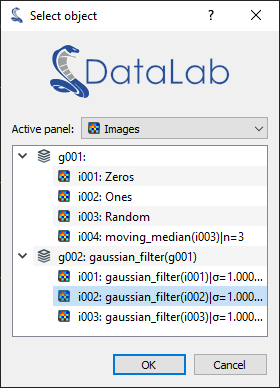
Screenshot of get object dialog (cdlclient.widgets.GetObjectDialog)#
Example of use:
# Copyright (c) DataLab Platform Developers, BSD 3-Clause license, see LICENSE file.

"""
DataLab Remote client get object dialog example
"""

# guitest: show

from guidata.qthelpers import qt_app_context

from cdlclient import SimpleRemoteProxy
from cdlclient.widgets import GetObjectDialog


def test_dialog():
    """Test connection dialog"""
    proxy = SimpleRemoteProxy()
    with qt_app_context():
        # 1. Select an image or signal object
        dlg = GetObjectDialog(None, proxy)
        if dlg.exec():
            obj = proxy.get_object(dlg.get_current_object_uuid())
            print(str(obj))
        # 2. Select a signal object only
        dlg = GetObjectDialog(None, proxy, panel="signal")
        if dlg.exec():
            obj = proxy.get_object(dlg.get_current_object_uuid())
            print(str(obj))
        # 3. Select an image object only
        dlg = GetObjectDialog(None, proxy, panel="image")
        if dlg.exec():
            obj = proxy.get_object(dlg.get_current_object_uuid())
            print(str(obj))


if __name__ == "__main__":
    test_dialog()